
Membership pauses and cancellations in RoninBox
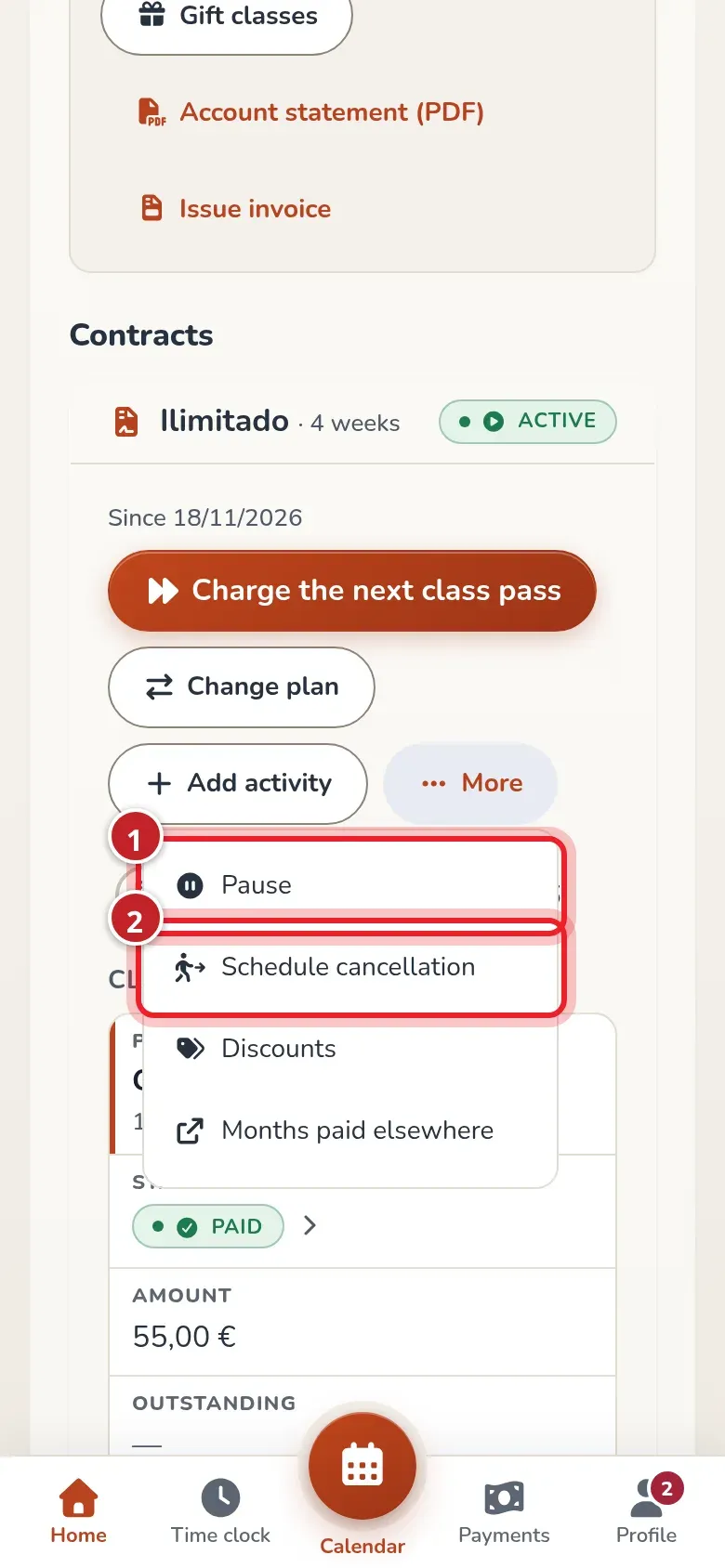
Pauses and cancellations are managed from the member’s profile, in Plan and class passes. Open More inside the contract card: that’s where you’ll find Pause and Schedule cancellation.
Administrators and coaches can manage these actions according to their money permissions. Coaches can also justify exceptions to the rules. Setting up rules and permissions is still up to the administration.
Pause a contract
Section titled “Pause a contract”- In More, tap Pause.
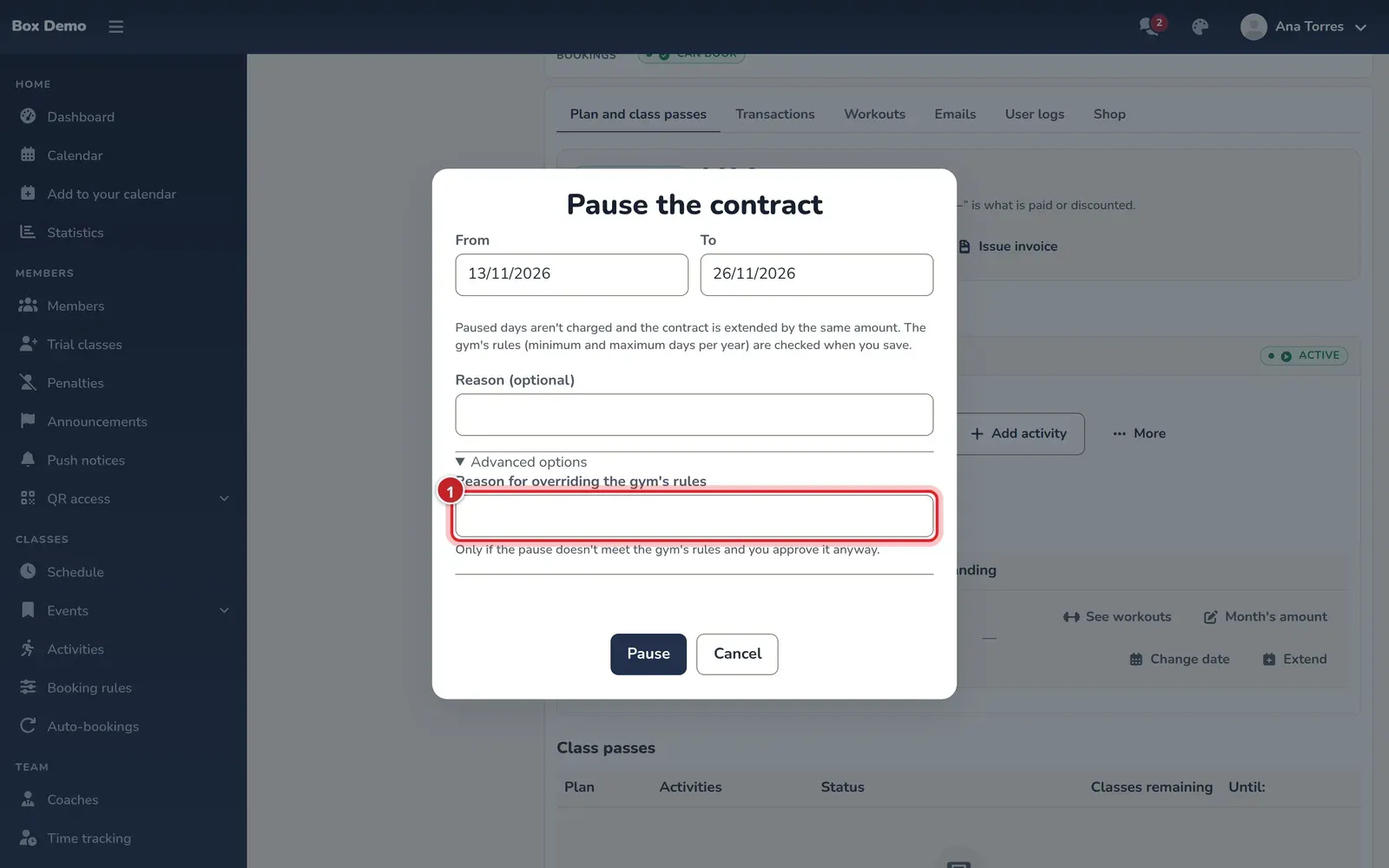
- In Pause the contract, choose From and To. Both days count; by default, two weeks from today are suggested.
- Enter the Reason (optional) if it helps identify the pause.
- Tap Pause.
- If the member has classes booked on those days, Bookings on paused days appears. Choose Release bookings or Keep them.
The pause saves its dates, days and reason in the history. During those days the member can’t book or check in with the QR code. Paused days are deducted from the month proportionally; a fully paused month costs €0 and includes no classes. If the contract has added activities, the pause deducts them too.
If the month was already paid, the paused days leave credit in their favor.
A pause that doesn’t meet the rules
Section titled “A pause that doesn’t meet the rules”The app checks the minimum length, the maximum days per year, overlaps and the contract dates. If a rule isn’t met, it shows the reason and keeps the window open.
With permission for the exception, open Advanced options and enter the Reason for overriding the gym's rules. It’s different from the pause’s optional reason: it explains why skipping that rule is authorized.
The gym’s rules—whether pauses are allowed, the shortest pause and the maximum days per year—are changed in Billing rules. Coaches can also authorize the exception if they still have the permission.
Transcript
Marta pauses an injured member for fourteen days and releases their bookings. The paid days become credit and the month is recalculated. She undoes the pause and checks that the contract goes back to Active and Up to date.
Resume early or undo the pause
Section titled “Resume early or undo the pause”- Resume today ends an ongoing pause yesterday. From today it counts as a normal month again; only the days they were actually paused are kept.
- Undo pause, on the pause line, charges those days again as if the pause never existed.
Bookings you released aren’t restored when you undo the pause.
Transcript
Marta opens a pause for a shoulder injury and taps Resume today. The pause ends yesterday and is reduced to three days. The contract goes back to Active and the credit is recalculated with those days.
Schedule a cancellation and undo it
Section titled “Schedule a cancellation and undo it”In More, tap Schedule cancellation. Check Last day: the member can book until that day. The following months are canceled and, if they were paid, the gym’s cancellation rule applies.
For a cancellation starting today, the month due is cut off at that day. If it was paid, the rule decides whether nothing is refunded, part is refunded or it stays as credit.
Before it takes effect, you can use Undo cancellation. You can’t undo a cancellation whose last day has already passed or one that has already refunded money.
Transcript
Marta schedules a cancellation for the last day of the month. Before that date arrives, she undoes it and checks that the contract goes back to Active.
Suspend access and readmit
Section titled “Suspend access and readmit”In the More in the profile header, Disable user suspends the contract and blocks booking and check-in. The profile and any existing debt are kept. With Enable user, the member is enabled again and the contract continues from that day.
Use this to cut off access. For someone leaving the gym, use a cancellation. A coach can only act on members, never on other staff.
Transcript
Marta disables Andrés: he loses access and his contract becomes Suspended, keeping the €38 debt. When he comes back, she enables him and the contract continues from that day.
Returning after a cancellation
Section titled “Returning after a cancellation”The ended contract appears collapsed and keeps its history. If the account is also disabled, check its access from the profile menu. Return after leaving stays outside the collapsed section.
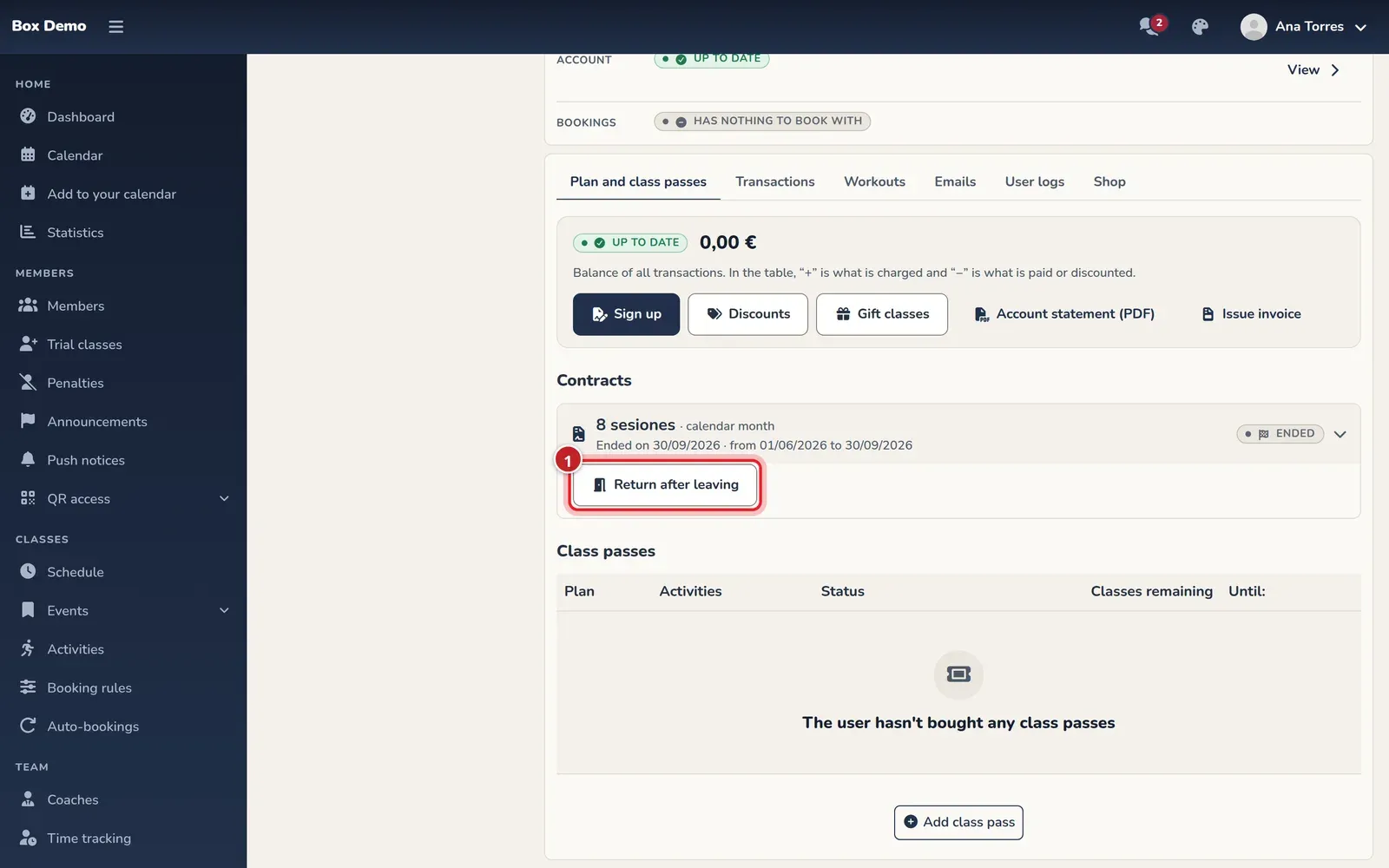
- Tap Return after leaving.
- In Return after leaving, check the first day. The contract comes back with its plan from that day.
- Confirm with Sign them up again and review the new month before charging.
The months they were away aren’t charged. If the gym has a sign-up fee in its fee catalog that’s charged on return, it goes with the first month. In Billing rules ▸ Cancellations and returns you decide whether members who return before a certain number of days aren’t charged.
To change who pays, transfer a block or merge members, ask RoninBox for help: these operations have no management screen.
Video: Canceling today: what’s charged and what isn’t
Section titled “Video: Canceling today: what’s charged and what isn’t”Transcript
This member hasn’t paid for the month and is leaving today
Last day: today
The month is cut off today: they only owe the days they came
Tonight the contract becomes “Ended”
If they already paid for the month, the gym’s rule decides
Here nothing is refunded: they can come until the end of the month
Video: Return after cancellation
Section titled “Video: Return after cancellation”Transcript
This member canceled two months ago
Their contract is still here, with all its history
They’re coming back today: no new contract needed
The months they were away aren’t charged
They’re charged their first month, and that’s it