
How to void a payment, refund it or write it off
Voiding a payment doesn’t delete it. RoninBox keeps the original entry and adds another one that voids or offsets it. It also records the reason, when it was done and who did it. A refund or a forgiven debt keeps the same audit trail.
Where to find corrections
Section titled “Where to find corrections”In the member’s profile, open Transactions. Each row offers the actions that apply to that entry. For members on four-week class passes, open the movements dropdown for that pass.
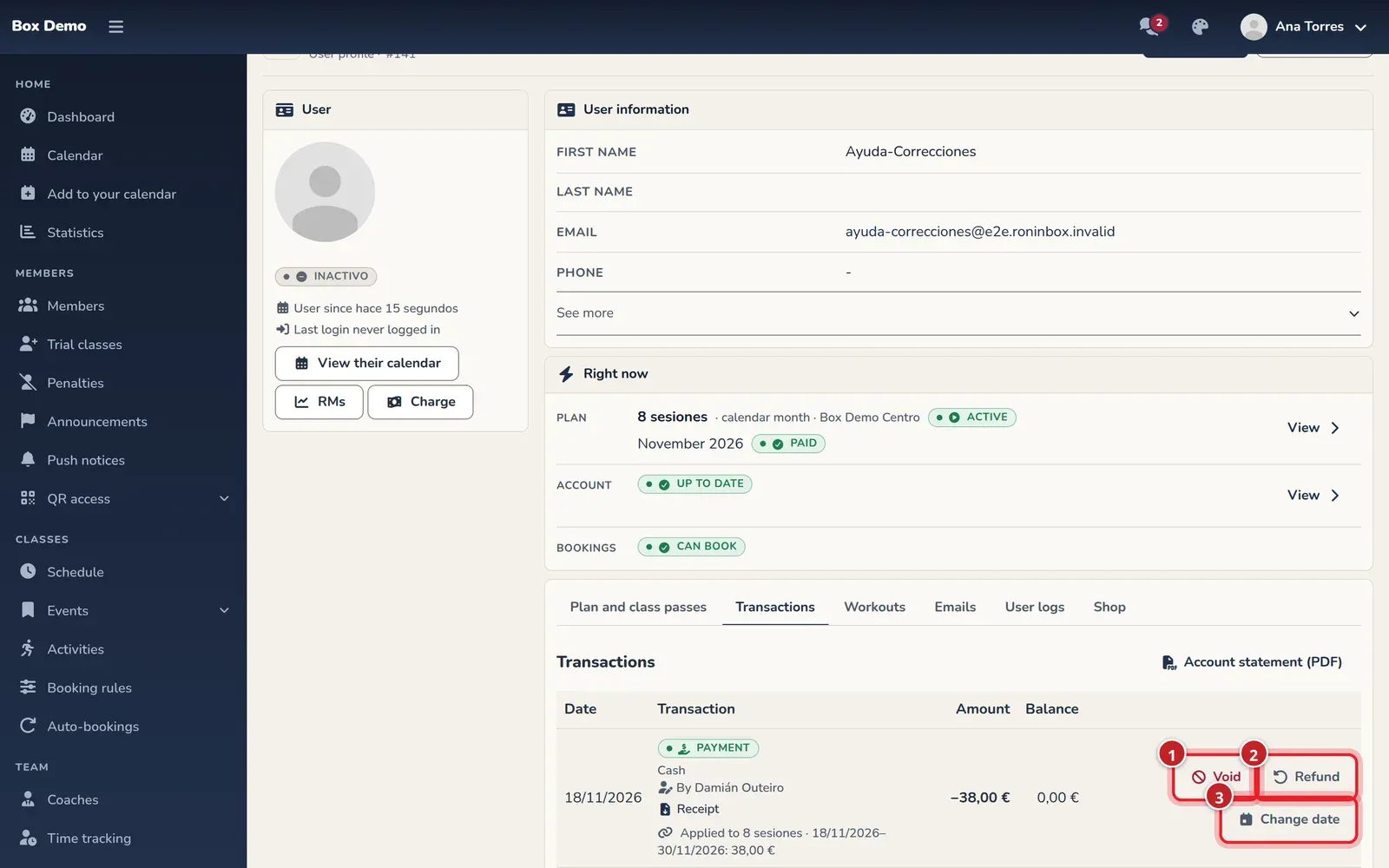
Corrections made by staff show “By” and their name in Movements, in a pass’s movements and in a month’s details. Automatic entries, such as Stripe or the voided charge when a pass is fully refunded, have no staff author. Coaches can’t delete recorded entries either.
Administrators and coaches can correct money by default. The administration can change the money permissions. If an action is restricted, ask the administration for help. Correction dialogs require a Reason. The correction keeps the original entry and its history.
Void an entry that should never have existed
Section titled “Void an entry that should never have existed”Use Void to fix a wrong entry, such as a duplicate payment that never actually came in. Enter the reason in Cancel the transaction and confirm with Cancel the transaction.
The original is marked Voided and a Reversal appears. If you void a payment, whatever it had covered is owed again. Don’t choose this action when the money did come in and you’re now giving it back to the member: that’s a refund.
Monthly charges and block installments can’t be voided from here; use the month or block action. Neither can an online or already invoiced payment. A payment with later corrections may require resolving those first; the window explains what’s blocking it.
Void a payment from Billing
Section titled “Void a payment from Billing”Administrators can also void a payment without opening the member’s profile. In the Daily and Monthly views of Billing, every manual payment that isn’t invoiced or voided has Void in its row. The same window opens: enter the reason and confirm with Cancel the transaction. The list updates and the void appears as a negative line. Only administrators see this button; coaches void from the member’s profile, if their money permissions allow it.
Refund money from a payment
Section titled “Refund money from a payment”Refund appears if there’s an amount left to refund.
- Open the payment’s action. Amount (€) shows what’s left to refund; enter less to refund only part of it.
- Choose how you’re returning the money: cash, card terminal, bank transfer or direct debit.
- Enter the reason and tap Refund.
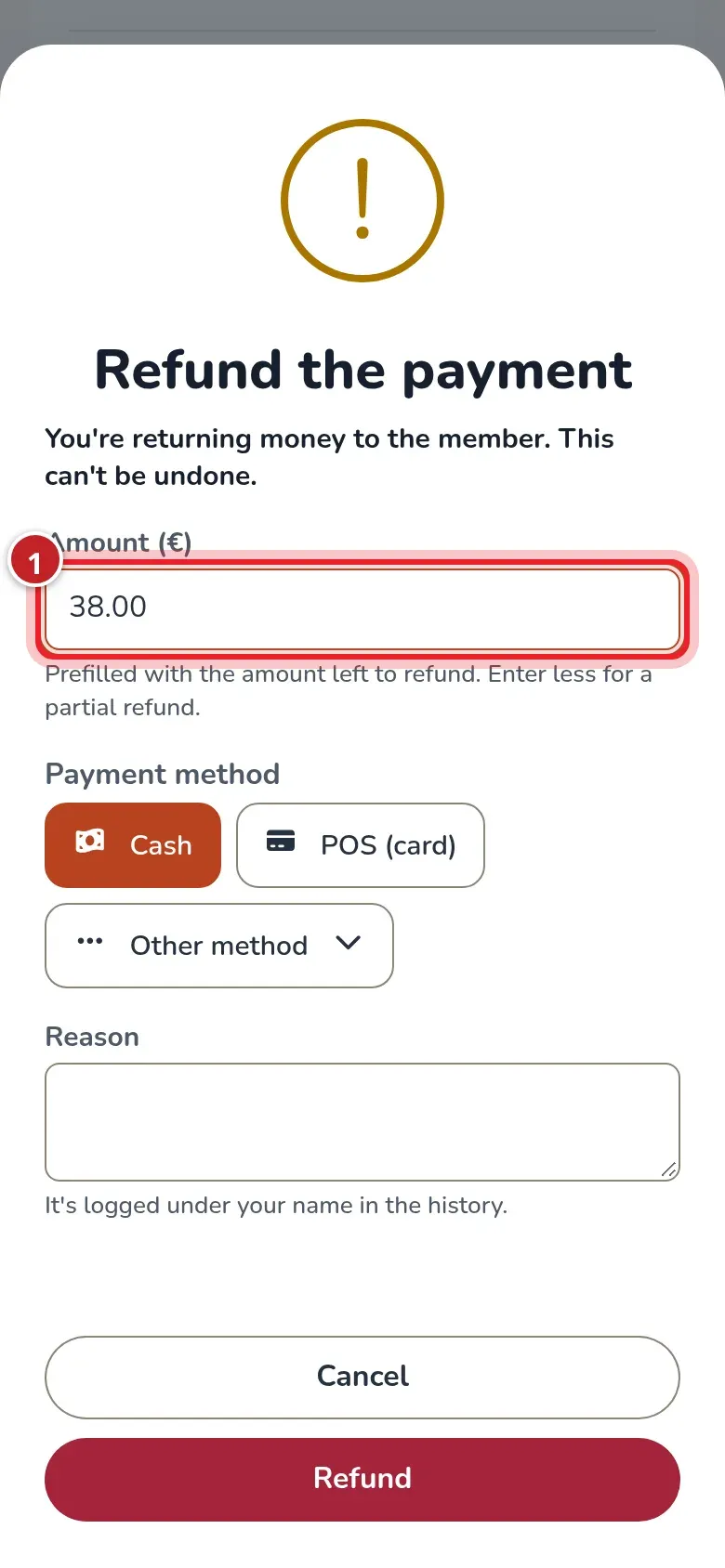
For an online payment, To the card, via Stripe is also offered and selected by default: it asks Stripe to refund the original card. It may take a few days to show up at the bank. If Stripe declines it, the window shows the reason and the refund isn’t recorded. Choosing another method means you’re returning the money that other way.
Refunding a month makes whatever that money paid for pending again. If you also don’t want to collect it, consider writing off the debt or voiding the month. You can’t refund more than what’s left of the payment. An already invoiced payment needs its tax correction handled outside this action.
Transcript
Marta first refunds €10 of a €55 payment and then the remaining €45. Two refunds are recorded with her name and the month is owed again. The payment no longer offers another refund.
A fully refunded class pass
Section titled “A fully refunded class pass”When you refund all of a class pass payment, the pass ends, its unused classes are removed and its charge is voided automatically. The account is Up to date without writing anything off. A partial refund keeps the pass and its classes, but makes the refunded amount pending again. If you’re refunding it as a discount and don’t want to charge it again, write off that amount.
Transcript
Marta refunds €50 from a full class pass. The pass ends, has no classes left and its charge is voided. The refund shows her name; the automatic voiding of the charge has no staff author.
Write off a debt
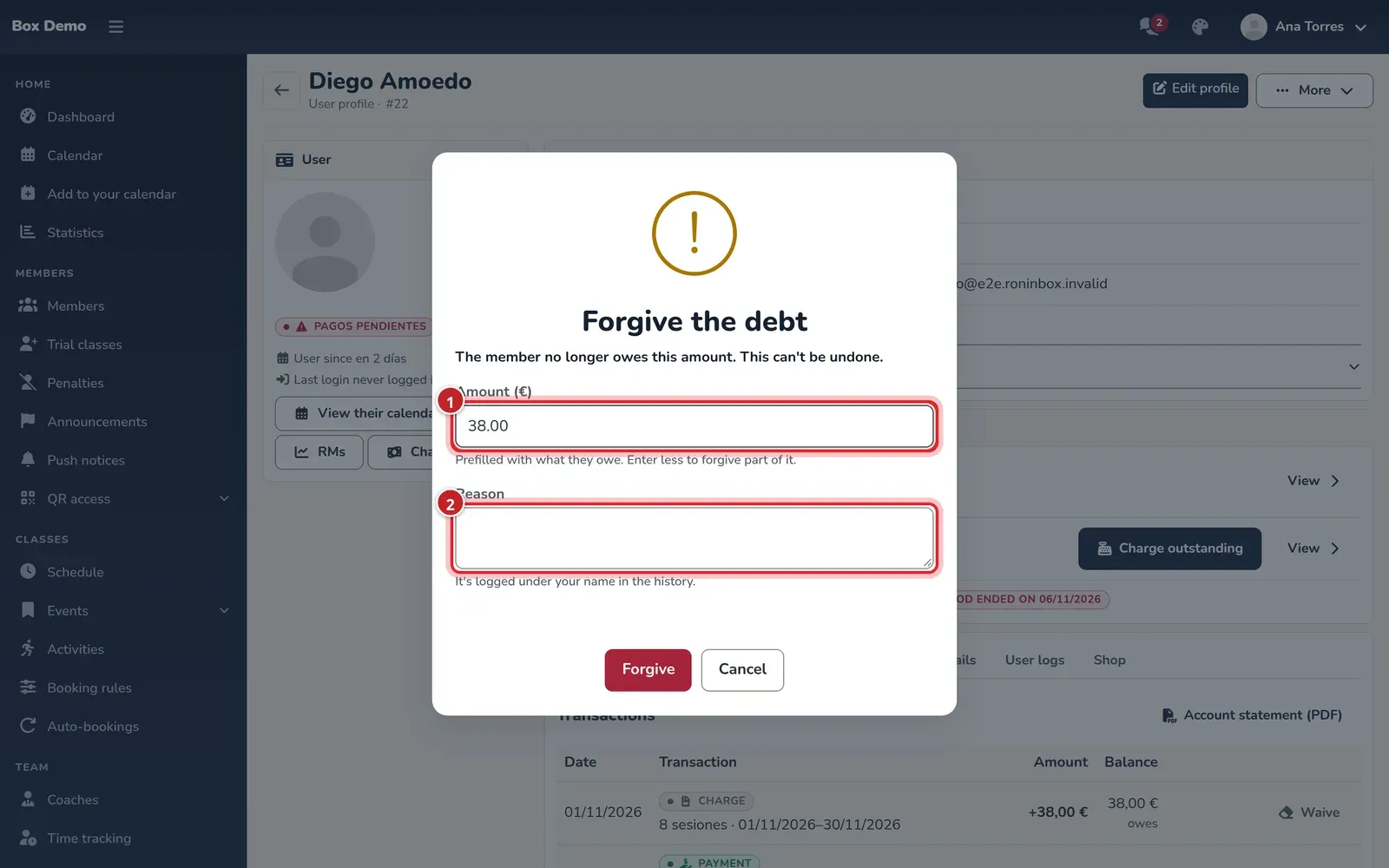
Section titled “Write off a debt”Waive forgives what’s pending on a charge or surcharge. In Forgive the debt, the amount defaults to the whole debt; you can lower it to write off part of it. Enter the reason and confirm. A Waived entry is recorded. It doesn’t refund money or change what’s already been paid.
Transcript
Ana reviews a long-time member’s contract and movements and writes off an inherited debt that didn’t apply. The correction keeps the reason and her name.
Change a payment’s date
Section titled “Change a payment’s date”Change date moves a manual payment to the day it was actually collected. It only works on payments from the last 31 days and with a date within those last 31 days, never in the future. It isn’t offered for online or invoiced payments.
In Change payment date, choose the Payment date, enter the reason and confirm with Change date. Behind the scenes, the previous entry is voided and recorded again with the correct date; the history keeps the change. Also check the receipt and the billing for both days.
Transcript
Marta moves a payment from Nerea recorded today to the previous day. Movements keeps the void and the payment with the new date; the receipt shows the correct day.
Void a month, a class pass or a block
Section titled “Void a month, a class pass or a block”In Plan and class passes, Void month marks the month Voided. This is only possible if it has no payments and isn’t part of a block.
Voided it by mistake? In the voided month’s row, tap Restore the month and enter the reason. The month is pending again, with a new charge and its classes, and it stays in the history. The voided charge stays voided. It requires the same permission as Void month.
It can’t be restored if the contract is paused, canceled or ended before that month, if another month already covers those days or if the month belongs to a block.
If you picked the wrong day when changing plans and the change hasn’t started yet, go back to Change plan, choose the same plan and set the right day.
Transcript
Ana restores November for Roi. First she confirms without a reason and the window shows what’s missing; then she enters the reason and the month is charged again with its classes. She also fixes the date of a pending plan change, keeping the same plan. The voided charge stays in the history and the restored month uses a new charge.
For a class pass, use Void the class pass; if it has a payment, check first how to undo it.
Transcript
The five-class pass Nerea bought by mistake is voided and her €50 is refunded. For the ten-class pass, only €20 is refunded and the amount that becomes pending again is written off, keeping the pass and its classes.
Void block undoes a block. Its months are charged separately again. Check Also cancel the block's payments (otherwise they stay as credit in their favor) if the block payment shouldn’t have existed either; otherwise, that money stays as account credit.
Receipts for one-off payments are corrected in General payments, with Cancel the receipt. They aren’t the payments in a member’s profile.
Video: Give a grace period and void a month
Section titled “Video: Give a grace period and void a month”Transcript
This member owes two months
They’ll pay on Friday: we give them a grace period until then
They can book; the debt is still there
Last month they didn’t come because of an injury
The reason is recorded with your name
The voided month doesn’t disappear: it’s crossed out
Now they only owe the current month
Video: Void a payment recorded twice
Section titled “Video: Void a payment recorded twice”Transcript
This member paid for one month, but the profile shows two paid.
“Movements” shows why: the same payment recorded twice.
The second entry has covered the current month.
Voiding doesn’t delete: it adds an offsetting entry.
The reason is required and is saved.
We confirm.
The payment is crossed out and its void carries the reason.
The month is owed again, as it should be.
Video: Refund an online payment to the card
Section titled “Video: Refund an online payment to the card”Transcript
Alba paid her month online. A card payment isn’t voided: it’s refunded.
The refund goes to the same card she paid with.
Stripe refunds her. It may take a few days for her to see it.
RoninBox sends the request to Stripe right away.
The refund is recorded with its reason.
The month is owed again: write it off or void it if she isn’t coming.