
Maintenance fee in RoninBox
A maintenance fee is what you charge each month to a member who stops coming for a while but wants to keep their spot. In RoninBox you do it with a plan that has no classes: it has a price and doesn’t include any classes.
Nothing else is needed: the member keeps their contract, their payment method and their history. Only the plan changes during the months they don’t come.
Create the maintenance plan
Section titled “Create the maintenance plan”The gym admin does this, just once.
-
Open Plans and shop ▸ Subscriptions and tap Create subscription.
-
Enter a clear name, for example “Maintenance fee”, and the price for one month (markers 1 and 2).
-
Check No classes (maintenance fee) (marker 3). The class lines are hidden: this plan only charges the fee.
-
Tap Save. In the list, the What the rate gives column shows No classes included.
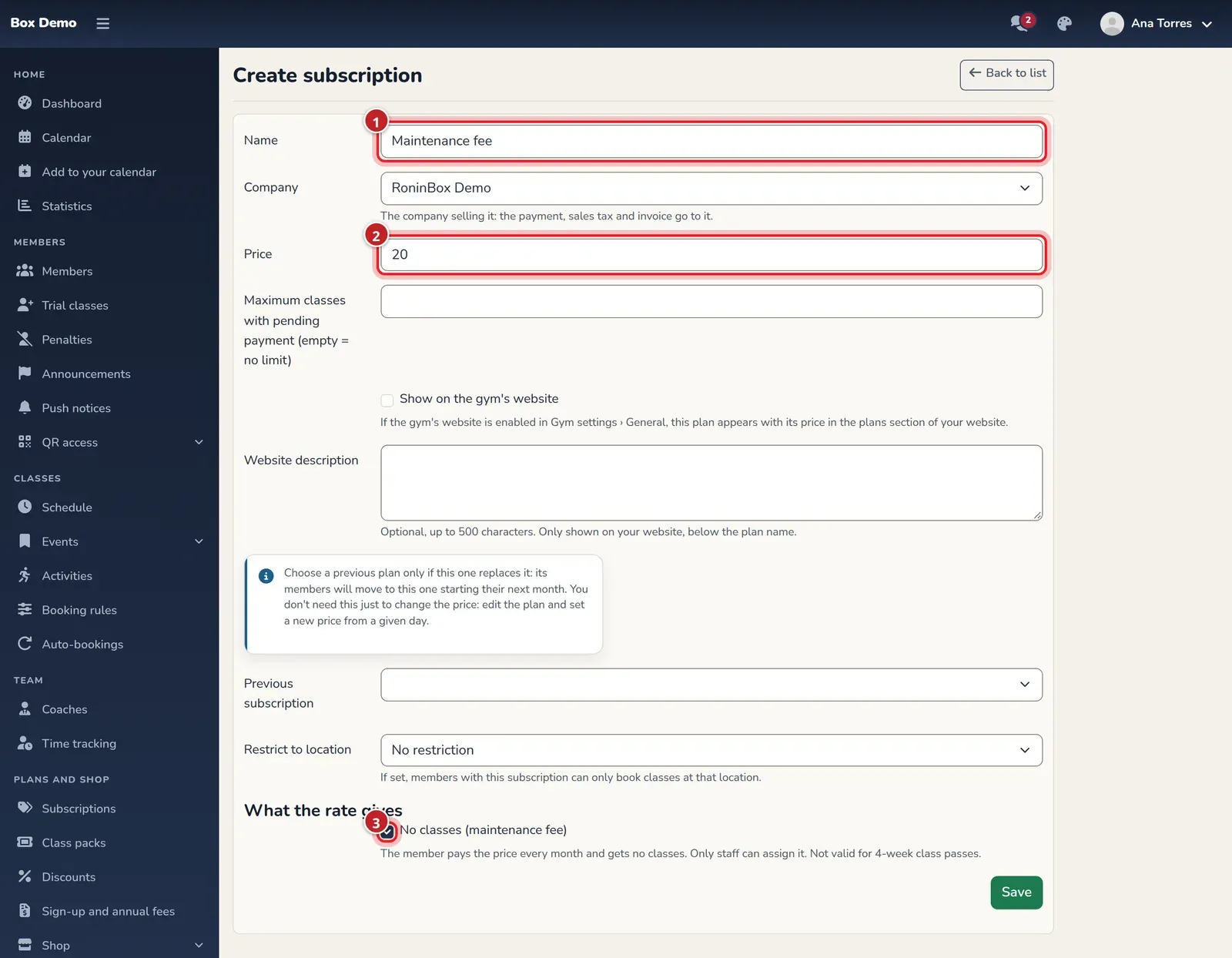
With the box checked, the plan has no class lines.
The narration could not play. Try again or follow the subtitles.
Transcript
Algunos socios pasan meses sin venir y quieren conservar su plaza.
Para cobrarles una cuota de mantenimiento, crea una tarifa que no da clases.
En «Subscripciones», pulsa «Crear Subscripción»,
ponle un nombre claro, como «Cuota de mantenimiento»,
y su precio al mes: aquí, 20 euros.
Marca «No da clases»: las líneas de clases desaparecen,
porque esta tarifa solo cobra la cuota.
Al guardar, la lista lo deja claro: sin clases incluidas.
Tus socios no la ven en su app; solo el personal puede asignarla.
Alguns sócios passam meses sem vir e querem manter o seu lugar.
Para lhes cobrar uma quota de manutenção, crie uma tarifa que não dá aulas.
Em «Subscrições», carregue em «Criar Subscrição»,
dê-lhe um nome claro, como «Cuota de mantenimiento»,
e o preço por mês: aqui, 20 euros.
Marque «Não dá aulas»: as linhas de aulas desaparecem,
porque esta tarifa só cobra a quota.
Ao guardar, a lista deixa-o claro: sem aulas incluídas.
Os seus sócios não a veem na app; só a equipa a pode atribuir.
Some members go months without coming in and want to keep their spot.
To charge them a maintenance fee, create a plan that gives no classes.
In “Subscriptions”, click “Create subscription”,
give it a clear name, such as “Cuota de mantenimiento”,
and its monthly price: here, 20 euros.
Check “No classes”: the class lines disappear,
because this plan only charges the fee.
Once you save, the list makes it clear: no classes included.
Your members don't see it in their app; only staff can assign it.
Algúns socios pasan meses sen vir e queren conservar a súa praza.
Para cobrarlles unha cota de mantemento, crea unha tarifa que non dá clases.
En «Subscricións», preme «Crear subscrición»,
ponlle un nome claro, como «Cuota de mantenimiento»,
e o seu prezo ao mes: aquí, 20 euros.
Marca «Non dá clases»: as liñas de clases desaparecen,
porque esta tarifa só cobra a cota.
Ao gardar, a lista déixao claro: sen clases incluídas.
Os teus socios non a ven na súa app; só o persoal pode asignala.
Alguns socis passen mesos sense venir i volen conservar la plaça.
Per cobrar-los una quota de manteniment, crea una tarifa que no dona classes.
A «Subscripcions», prem «Crea una subscripció»,
posa-li un nom clar, com ara «Cuota de mantenimiento»,
i el preu mensual: aquí, 20 euros.
Marca «No dona classes»: les línies de classes desapareixen,
perquè aquesta tarifa només cobra la quota.
En desar, la llista ho deixa clar: sense classes incloses.
Els teus socis no la veuen a l’app; només el personal la pot assignar.
Download: SRT subtitlesVTT subtitlesAudio
You can’t check the box on a plan that replaces another one (with Previous subscription): it would leave every member on the previous plan without classes. You also can’t change it on a plan that members already have; for that, create a new plan.
Move a regular member to maintenance
Section titled “Move a regular member to maintenance”The admin or a coach can do this from the member’s profile.
-
Open the member’s profile and go to Plan and class passes.
-
On the contract card, tap Change plan and choose the maintenance fee (marker 1).
-
Under Starting when?, leave Next month (marker 2): this month stays as it was, with their classes, and the fee starts on the 1st.
-
Confirm with Change plan.
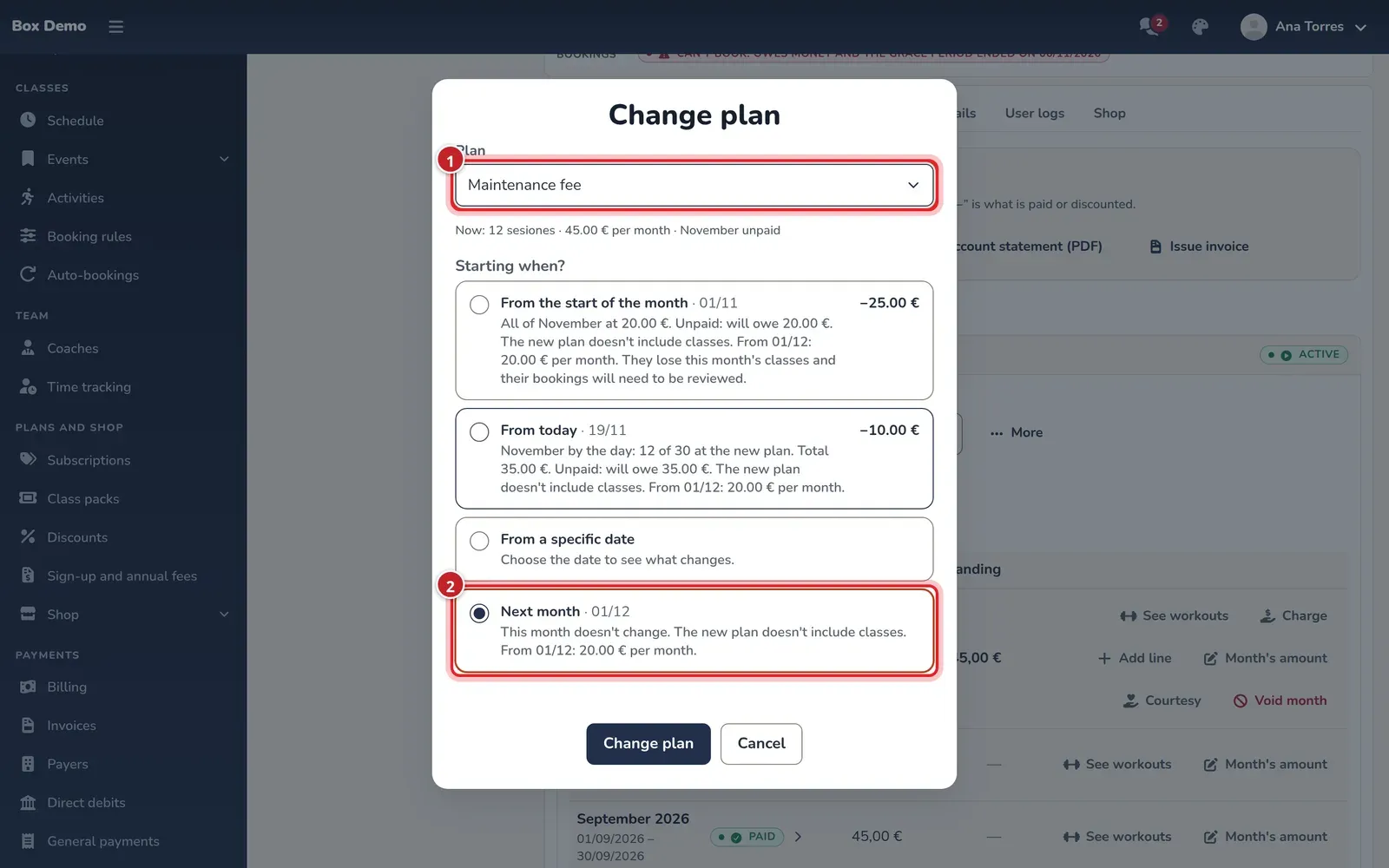
Each option warns that the new plan won't include classes.
The narration could not play. Try again or follow the subtitles.
Transcript
Este socio paga Ilimitado y ya tiene este mes pagado.
Avisa de que el mes que viene no podrá venir, pero quiere mantener su plaza.
En su ficha, dentro de «Tarifa y bonos», pulsa «Cambiar tarifa»
y elige «Cuota de mantenimiento».
Deja «Próximo mes»: este mes sigue como estaba, con sus clases,
y la cuota empieza el día 1.
La tarjeta te avisa de que con la tarifa nueva no tendrá clases
y de lo que pagará cada mes.
Al confirmar, la historia del contrato guarda los dos tramos:
Ilimitado hasta fin de mes y la cuota desde el día 1.
A partir de entonces se le cobra como cualquier otro mes
y, si algún día quiere entrenar, puede comprar un bono.
Este sócio paga Ilimitado e já tem este mês pago.
Avisou que no próximo mês não vai poder vir, mas quer manter o lugar.
Na ficha dele, em «Tarifa e bónus», carregue em «Mudar de tarifa»
e escolha «Cuota de mantenimiento».
Deixe «Próximo mês»: este mês fica como estava, com as aulas,
e a quota começa no dia 1.
O cartão avisa que, com a tarifa nova, não terá aulas
e mostra quanto pagará por mês.
Ao confirmar, o histórico do contrato guarda os dois períodos:
Ilimitado até ao fim do mês e a quota a partir do dia 1.
A partir daí, cobra-se como qualquer outro mês
e, se um dia quiser treinar, pode comprar um pack.
This member is on Ilimitado and has already paid for this month.
They can't come next month, but they want to keep their spot.
In their file, under “Plan and class passes”, click “Change plan”
and choose “Cuota de mantenimiento”.
Leave “Next month”: this month stays as it was, classes included,
and the fee starts on the 1st.
The card warns you that the new plan has no classes
and shows what they'll pay each month.
When you confirm, the contract history keeps both stretches:
Ilimitado until the end of the month and the fee from the 1st.
From then on, they're charged like any other month,
and if they ever want to train, they can buy a class pass.
Este socio paga Ilimitado e xa ten este mes pagado.
Avisa de que o mes que vén non poderá vir, pero quere manter a súa praza.
Na súa ficha, dentro de «Tarifa e bonos», preme «Cambiar tarifa»
e escolle «Cuota de mantenimiento».
Deixa «Próximo mes»: este mes segue como estaba, coas súas clases,
e a cota empeza o día 1.
A tarxeta avísate de que coa tarifa nova non terá clases
e do que pagará cada mes.
Ao confirmar, a historia do contrato garda os dous tramos:
Ilimitado ata fin de mes e a cota desde o día 1.
A partir de aí cóbraselle como calquera outro mes
e, se algún día quere adestrar, pode mercar un bono.
Aquest soci paga Ilimitado i ja té aquest mes pagat.
Avisa que el mes que ve no podrà venir, però vol mantenir la plaça.
A la seva fitxa, dins de «Tarifa i bons», prem «Canvia la tarifa»
i tria «Cuota de mantenimiento».
Deixa «Mes següent»: aquest mes continua igual, amb les seves classes,
i la quota comença el dia 1.
La targeta t’avisa que amb la tarifa nova no tindrà classes
i del que pagarà cada mes.
En confirmar, l’historial del contracte guarda els dos trams:
Ilimitado fins a final de mes i la quota des del dia 1.
A partir d’aleshores se li cobra com qualsevol altre mes
i, si algun dia vol entrenar, pot comprar un bo.
Download: SRT subtitlesVTT subtitlesAudio
The contract history keeps both periods: their plan until the end of the month and the fee from the 1st. From that day on they’re charged like any other month, with their usual payment method. If they pay by automatic subscription, the amount adjusts on its own.
When they come back to train
Section titled “When they come back to train”Give them back their plan with the same button.
-
On the contract card, tap Change plan and choose their usual plan.
-
Choose when it starts:
- From today: they can book from today. The month is charged by the day, with the fee until yesterday and their plan from today, and the card shows you the difference left to pay.
- Next month: they return on the 1st and this month stays on maintenance.
-
Confirm. If anything is left to pay this month, Charge opens with the amount filled in.
The narration could not play. Try again or follow the subtitles.
Transcript
Este socio lleva el mes en cuota de mantenimiento y hoy vuelve a entrenar.
Pulsa «Cambiar tarifa» y elige su tarifa de siempre, Ilimitado.
Para que pueda reservar desde hoy, elige «Desde hoy»:
el mes se calcula por días, con la cuota hasta ayer e Ilimitado desde hoy,
y la tarjeta te enseña la diferencia que queda por cobrar.
Al confirmar se abre «Cobrar» con ese importe; cóbralo en efectivo.
En la historia, la cuota termina ayer y su tarifa vuelve desde hoy,
así que ya puede reservar.
Si prefieres que vuelva el día 1, elige «Próximo mes»
y este mes sigue en mantenimiento.
Este sócio passou o mês na quota de manutenção e hoje volta a treinar.
Carregue em «Mudar de tarifa» e escolha a tarifa de sempre, Ilimitado.
Para que possa reservar já hoje, escolha «A partir de hoje»:
o mês conta-se por dias, com a quota até ontem e Ilimitado desde hoje,
e o cartão mostra a diferença que fica por cobrar.
Ao confirmar, abre-se «Cobrar» com esse valor; cobre-o em dinheiro.
No histórico, a quota termina ontem e a tarifa volta a partir de hoje,
por isso já pode reservar.
Se preferir que volte no dia 1, escolha «Próximo mês»
e este mês continua na manutenção.
This member has been on the maintenance fee all month and is back training today.
Click “Change plan” and choose their usual plan, Ilimitado.
So they can book from today, choose “From today”:
the month is worked out by days, the fee until yesterday and Ilimitado from today,
and the card shows you the difference still to charge.
When you confirm, “Charge” opens with that amount; take it in cash.
In the history, the fee ends yesterday and their plan is back from today,
so they can book right away.
If you'd rather they come back on the 1st, choose “Next month”
and this month stays on the maintenance fee.
Este socio leva o mes na cota de mantemento e hoxe volve adestrar.
Preme «Cambiar tarifa» e escolle a súa tarifa de sempre, Ilimitado.
Para que poida reservar desde hoxe, escolle «Desde hoxe»:
o mes calcúlase por días, coa cota ata onte e Ilimitado desde hoxe,
e a tarxeta amósache a diferenza que queda por cobrar.
Ao confirmar ábrese «Cobrar» con ese importe; cóbrao en efectivo.
Na historia, a cota remata onte e a súa tarifa volve desde hoxe,
así que xa pode reservar.
Se prefires que volva o día 1, escolle «Próximo mes»
e este mes segue en mantemento.
Aquest soci ha passat el mes amb la quota de manteniment i avui torna a entrenar.
Prem «Canvia la tarifa» i tria la tarifa de sempre, Ilimitado.
Perquè pugui reservar des d’avui, tria «Des d’avui»:
el mes es calcula per dies, amb la quota fins ahir i Ilimitado des d’avui,
i la targeta t’ensenya la diferència que queda per cobrar.
En confirmar s’obre «Cobra» amb aquest import; cobra’l en efectiu.
A l’historial, la quota acaba ahir i la seva tarifa torna des d’avui,
així que ja pot reservar.
Si prefereixes que torni el dia 1, tria «Mes següent»
i aquest mes continua en manteniment.
Download: SRT subtitlesVTT subtitlesAudio
Their automatic bookings start working again as soon as their plan includes classes.
What the member sees while on maintenance
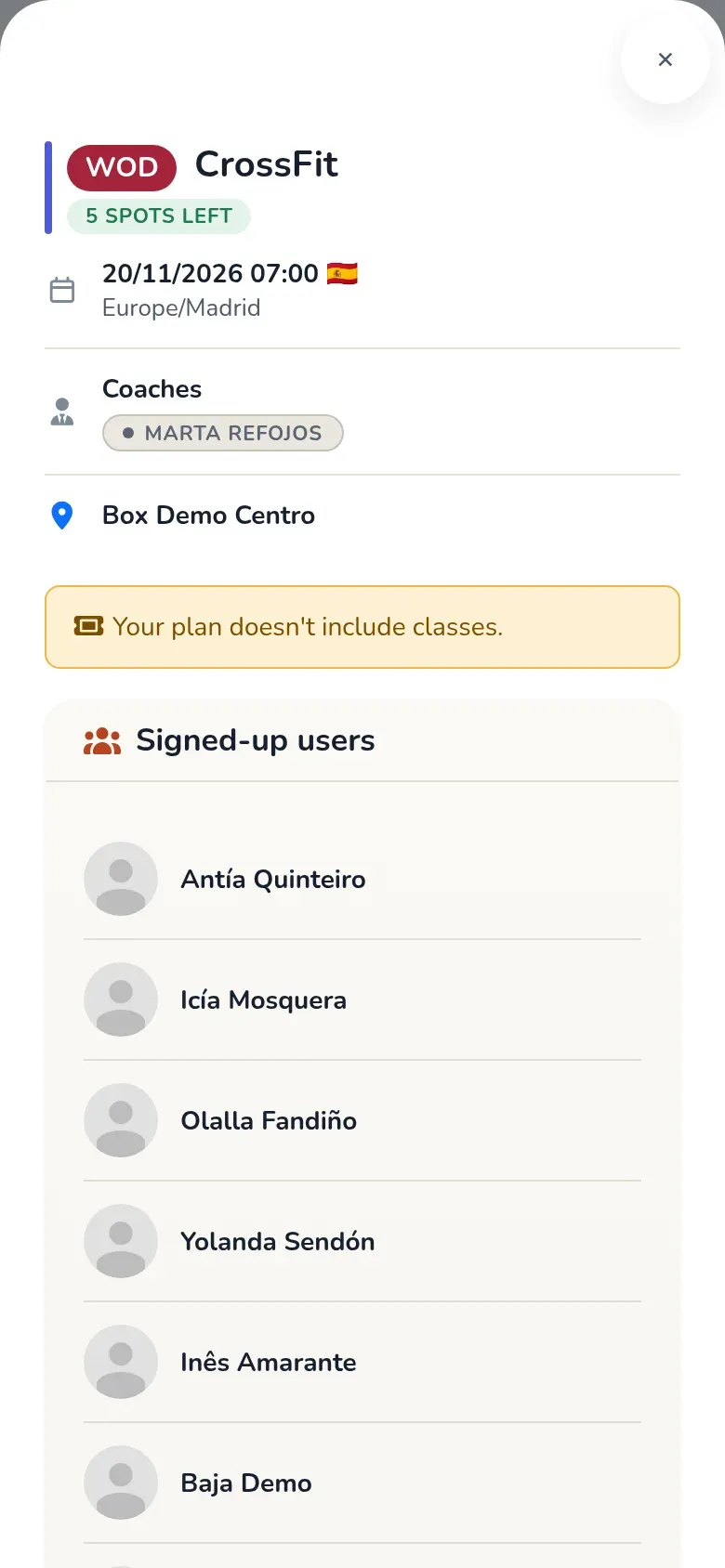
Section titled “What the member sees while on maintenance”- When they open a class, the app tells them Your plan doesn't include classes. and, if the gym sells class passes online, offers Buy a class pass.
- They can’t change plans themselves: to come back, they talk to the gym.
- Their automatic bookings aren’t made and they don’t get notices about running out of classes.
- They can only get in with the QR code on days they have a class booked, for example with a class pass.
Limits
Section titled “Limits”- It can’t be used on 4-week class pass contracts.
- It doesn’t appear in the member app: neither when signing up nor when changing plans.
- It can’t be added as an activity to another contract.
Common mistakes
Section titled “Common mistakes”- It won’t let me save the plan. Without checking No classes (maintenance fee), a plan needs at least one class line.
- I don’t see the fee when signing up a member. Your gym uses 4-week class passes: it can’t be used there.
- The member lost this month’s classes. From the start of the month was chosen. Change their plan again from that same day to give them back.