
How to manage my cookies and privacy
To manage your cookies, open Profile, scroll down to the Privacy and cookies card and tap Cookie settings. A cookie is a small piece of data the app stores on your phone. Some are essential. Others are optional and up to you, and you can change your mind anytime.
What cookies there are and which ones you decide
Section titled “What cookies there are and which ones you decide”The first time you open the app, a "Cookie use" notice may appear with three buttons: Accept all, Reject all and Customize. Rejecting doesn’t change anything you can do in the app.
RoninBox groups cookies into six purposes:
| Purpose | What it’s for | Do you decide it in the app? |
|---|---|---|
| Strictly necessary | Keeping you signed in, protecting forms and remembering your cookie choice. | No. They’re always on, because the app doesn’t work without them. |
| Analytics | Measuring which screens are used to improve the app. | Yes. It’s off by default. |
| Preferences | Remembering a choice of yours, such as language. | The app doesn’t use it today. |
| Advertising | Measuring campaigns and showing ads. | The app doesn’t use it today. |
| Third-party content | Content from other providers, such as videos or maps. | The app doesn’t use it today. |
| Spam protection | Telling people apart from bots on the contact form of the RoninBox public website. | It doesn’t appear in the app. |
So inside the app, the panel only shows Strictly necessary and Analytics.
Change your choice
Section titled “Change your choice”-
Open Profile and scroll down to Privacy and cookies.
-
Tap Cookie settings (marker 2).
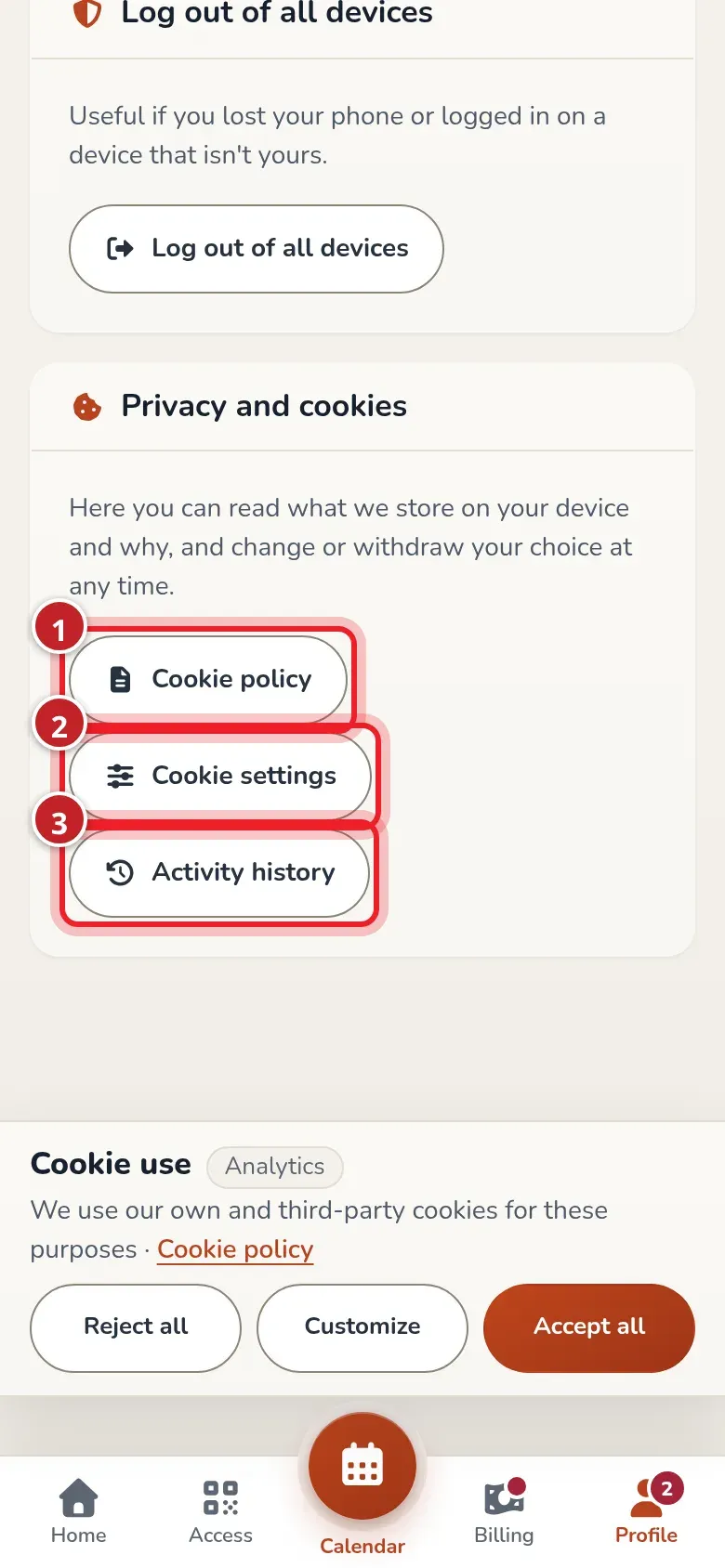
The privacy card, at the bottom of Profile. -
In the panel, check Allow analytics if you want to allow it, or leave it unchecked.
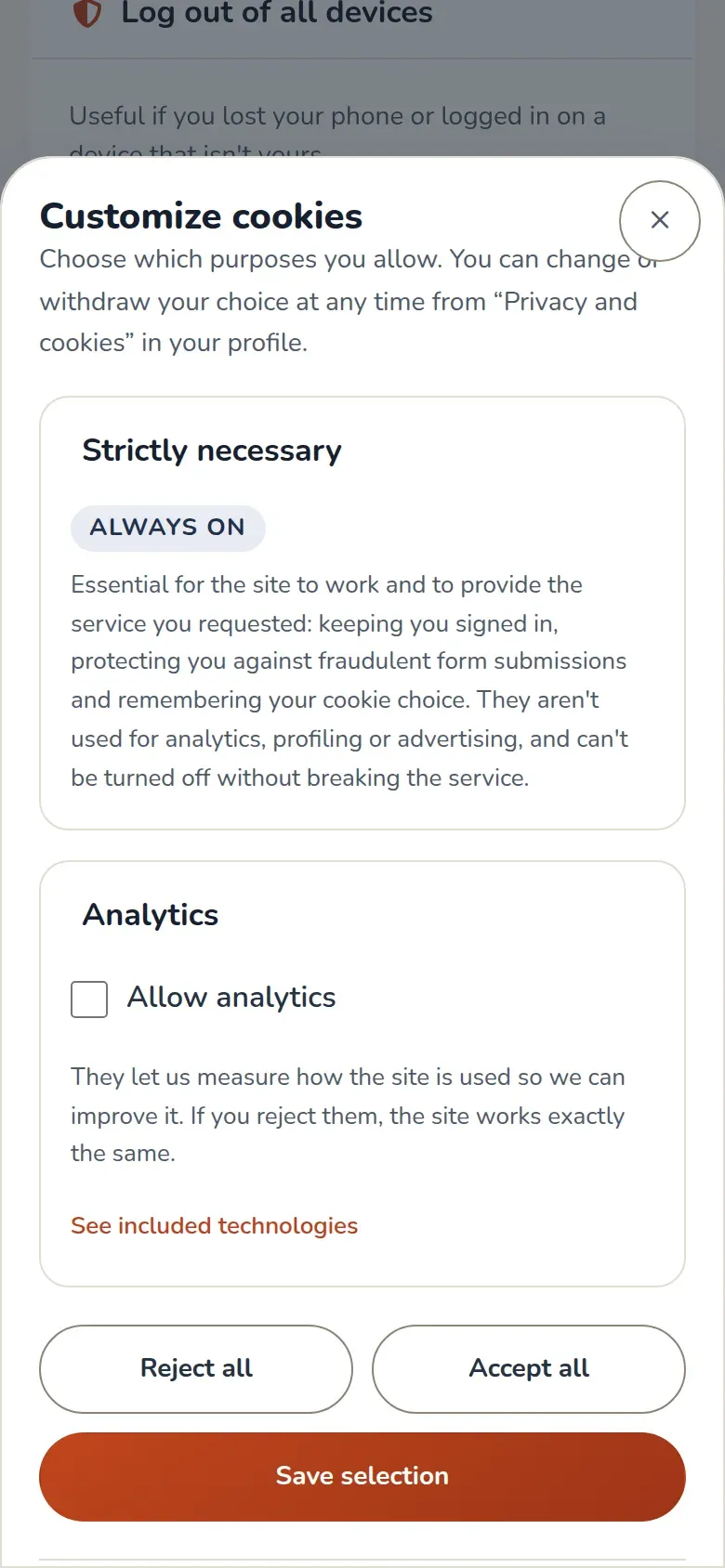
The cookie panel. Necessary cookies can't be turned off. -
Tap Save selection. You can also use Reject all or Accept all.
To withdraw your consent, open the same panel and tap Withdraw my consent. The app deletes the cookie with your choice and the ones left by analytics from your phone, and stops loading it. Whatever the analytics company stored on its own domain can’t be deleted by the app: you remove it from your browser settings.
The Cookie policy button (marker 1) opens the policy with all the details: what each cookie stores, for how long and who manages it.
What other members see
Section titled “What other members see”In the classes you sign up for, other members of the gym see your name and your profile photo: in the calendar, on the board and in the class’s sign-up list. Also in past classes, because the calendar shows who attended each class. If you haven’t added a name to your profile, it shows Member and never your email address.
There’s no option to hide yourself: it’s part of how the gym calendar works and it’s stated in the privacy notice. If you don’t want your photo to be seen, you can delete it from your profile.
Activity log
Section titled “Activity log”The Activity history button (marker 3) opens an explanation of what gets recorded about what happens in your account. It isn’t a list of your activity: it’s the text explaining what data is stored, why, for how long and who can see it. Among other things, it says that your bookings and cancellations, your payments and class passes, your logins and changes to your details are stored, and that your password, your card details and your IP address are never stored.
My privacy agreements
Section titled “My privacy agreements”This section only exists if your gym has it turned on. Then the card is renamed Privacy and legal and has two more buttons: Privacy and gym rules and My privacy agreements. Privacy and legal also appears among the shortcuts in Profile.
Your gym’s privacy policy and rules
Section titled “Your gym’s privacy policy and rules”Privacy and gym rules opens the Gym legal documents list: the privacy policy, the terms and rules, marketing communications and the photo and video authorization your gym currently has in effect. Tap any of them to read it in full. Above it, you’ll see who is responsible for your data (company name, NIF, address) and the email to write to to exercise your rights.
Decide on your gym’s privacy
Section titled “Decide on your gym’s privacy”When it’s turned on, the first time you open the app (or when the gym publishes a new text that requires your answer), a window appears that won’t close until you decide. It’s called "Your gym's documents" and includes:
- What’s required to continue. Two checkboxes: confirming you’ve read the data protection information and accepting the gym’s terms. You can’t continue without them.
- What’s optional. Receiving marketing communications from the gym by email, by SMS or WhatsApp and by phone, and authorizing photos and videos. Each one with Yes or No. If you don’t choose anything, nothing is saved. Rejecting doesn’t block anything.
- RoninBox communications. This is a different company from your gym. What you choose applies to every gym where you use RoninBox. If you say yes to email, you’ll be asked to confirm it from your inbox, and until then they won’t write to you.
Tap Save and continue to save.
Afterward, My privacy agreements takes you to a screen where you can see what you decided, the exact text you decided on and the history of your answers. You can withdraw the optional items with Withdraw. The required items can’t be withdrawn there: they’re replaced when the gym publishes a new version.
Common issues
Section titled “Common issues”- I don’t see Cookie settings. It only appears if the app has an optional purpose to decide on.
- I want to change my marketing choice and can’t find where. Check My privacy agreements, if your gym has it turned on.
- I can’t find my gym’s privacy policy. If your gym has privacy turned on, it’s in Profile > Privacy and legal > Gym privacy and rules. If you don’t see it, ask your gym for it.