
4-week class passes
4-week class passes are the 28-day periods of rolling-month contracts. Each one has its own dates, classes and payment. The admin and the coach manage them in the member’s profile, from Members ▸ Members ▸ Plan and class passes.
Which gyms use them
Section titled “Which gyms use them”- The admin opens Gym settings ▸ Billing rules. Under Monthly fee type they choose 4 weeks: 28-day passes from each member's sign-up day and save. This setting only affects new contracts; it doesn’t change existing ones.
- Sign up the member from their profile. Their contract shows 4 weeks and the list is called Class passes.
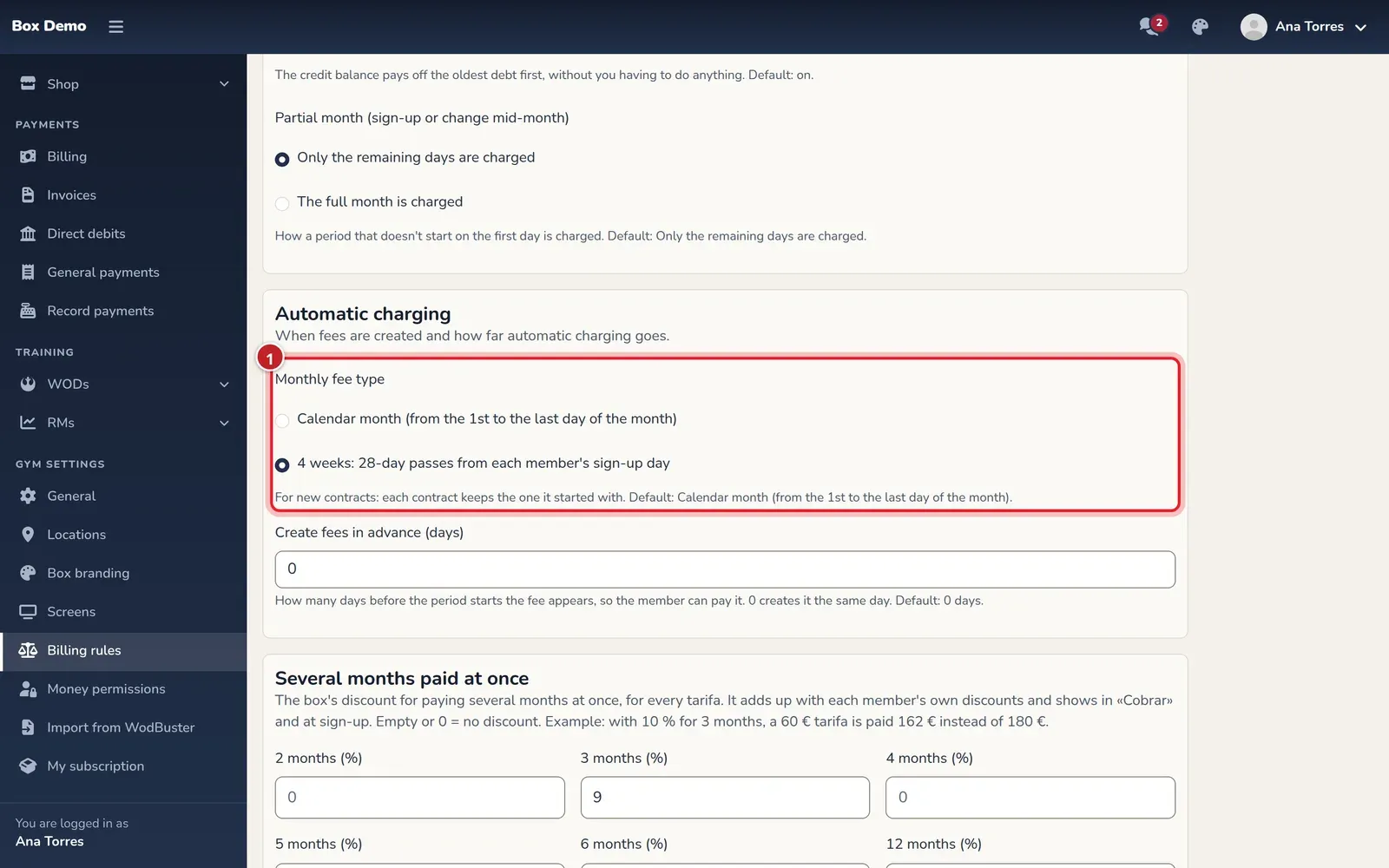
The first class pass starts on the sign-up day. Each pass lasts 28 days. A plan of two classes per week gives eight classes for the whole pass: they can be used in any week of the period, with no weekly cap. Passes carried over from the previous system keep their dates; they may last 29 days.
Transcript
This gym charges by 4-week class passes No half months here: the pass starts today Save Their first pass: 28 days, €38. Pending, not debt Charged by passes, not by months Pays in cash Record payment Paid. The next one will start on December 4 In Transactions, each pass with its payment and receipt
A pending class pass is not a debt
Section titled “A pending class pass is not a debt”A class pass with no payments and no used classes shows Payment pending if it hasn’t started yet or is still within the grace days. At the top you can see Up to date and, below, the notice with the amount and date of the next pending pass.
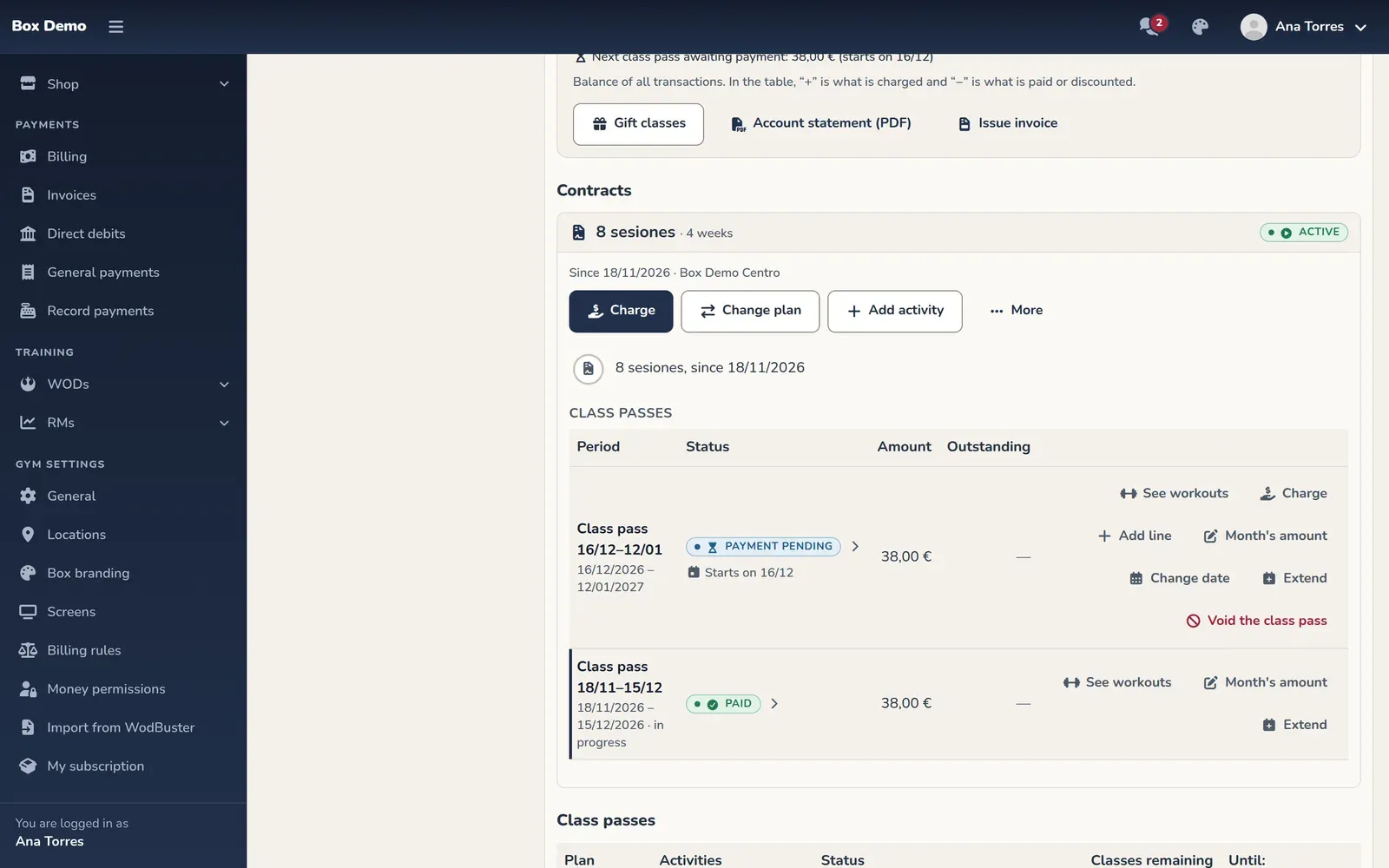
That pass doesn’t block bookings or the door, doesn’t turn on the red debt alert, isn’t included in paying off all debt and doesn’t use up the unpaid class limit. As soon as a class from that pass is booked or used without paying for it, it does count as debt, with the matching status: To charge or Overdue.
If the grace period ends with no payment and no classes used, the pass is voided with no debt and the contract ends with the previous pass. The row shows Lapsed unpaid and unused: the contract ended with the class pass before. If a later pass is already paid or used, the unused pass is skipped and the contract continues; it shows Neither paid nor used: voided with no debt, the contract goes on with the next class pass.
If the member comes back after their contract ended, they pay and their new pass starts that day.
Transcript
Elba stopped coming in October. Her contract ended on its own Let’s see what happened to her last pass She didn’t pay it or use any class: when the grace period ended, it was voided The contract ends with the last pass she did have She owes nothing: that pass’s charge is voided (the system voids it, with no “By”); in “View transactions” for the previous pass, her payment with “By Ana Torres” If she comes back, she pays and her new pass starts that same day
Charge the next class pass
Section titled “Charge the next class pass”- On the contract card, tap Charge the next class pass. The next pass and the payment dialog open. Closing the dialog without recording the payment leaves the pass open, pending payment.
- Check How many class passes?, the dates and the amount. Staff can charge several passes at once. You can also use Charge on the row of an open pass.
- Choose the payment method and record the payment, following Collect cash and other payment methods.
Normally the next pass starts the day after the current one ends, on the same weekday. If it already ended, it starts on the payment day. If the member used up all classes early, the next one can start the day after their last class. It’s never charged just because they used them up.
The daily process opens the next pass when the current one ends. Staff can open it earlier with the charge button; the member, by starting their online payment. There’s no automatic renewal on a saved card.
Change the class pass date
Section titled “Change the class pass date”- On the pass row, tap Change date.
- In Change the class pass's date, change Starts on.
- Review and confirm with Change date.
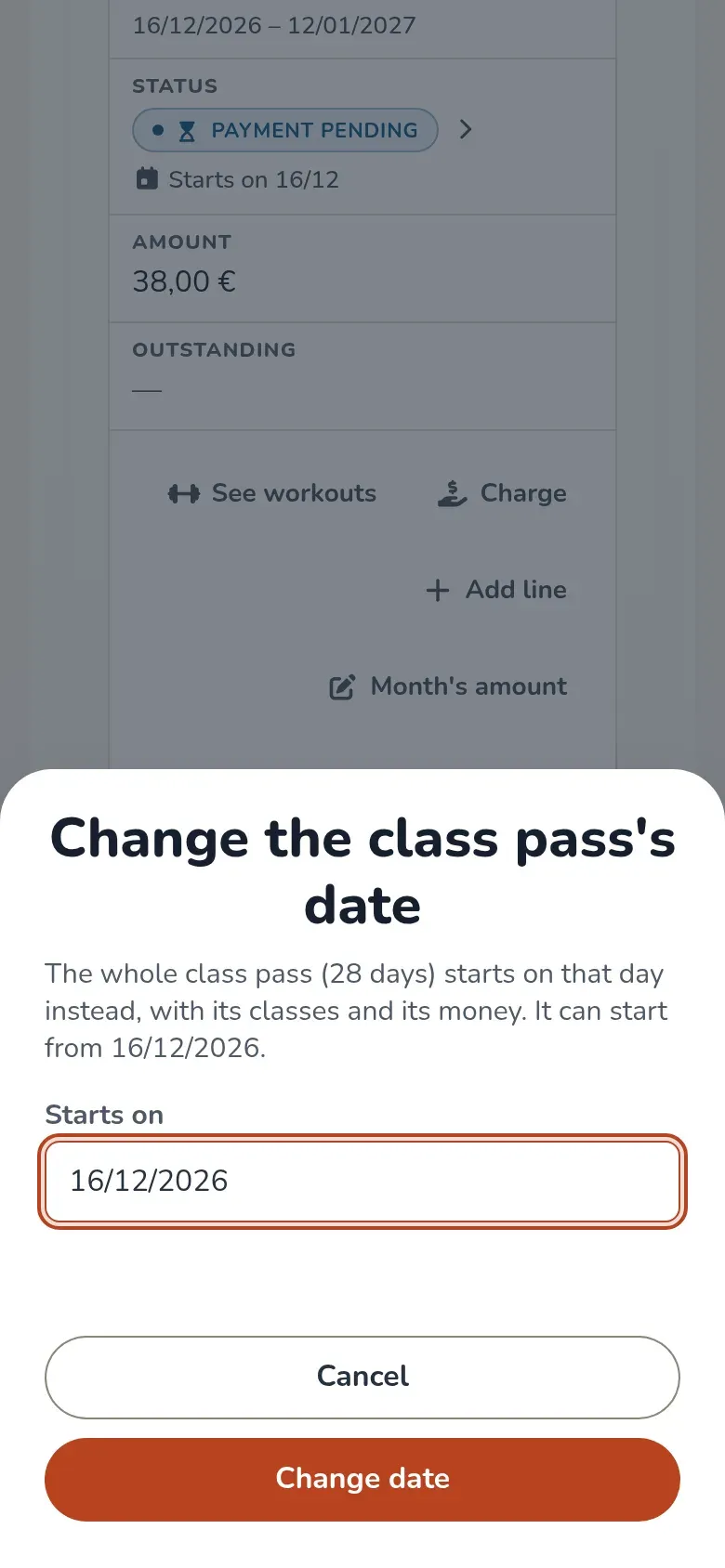
You can move the last pass, paid or unpaid. At the earliest, the day after the previous pass; if its classes ran out, the day after the last class used. With no booked classes you can push it back with no limit: the days between passes are neither charged nor give classes.
It also moves with booked classes, but never past its first class, and its bookings stay in the pass. Staff can choose past days: if you signed up a member on the 13th and they didn’t come or pay until the 23rd, move their pass to the 23rd and their 28 days count from there.
The member does it from My class pass on their Home, only if the gym has online payments and always from today on. When paying a pending pass, they choose the start day right there. Without online payments, staff change it from the member’s profile.
Extend a class pass
Section titled “Extend a class pass”The admin and the manager can extend a pass that hasn’t ended yet. Coaches don’t have this action. On the pass row, tap Extend.
- In Extend the class pass, choose a New last day later than the current one.
- Enter the Reason and confirm with Extend.
- Check the new dates and the event in the contract history.
Its classes are valid until the new last day. The money doesn’t change and no new charge is created. If there’s a next pass with no booked classes, it starts the day after and keeps its 28 days and its payment.
If the next pass already has a booked class, the window limits the extension so it doesn’t overlap it. The contract end is also respected. The history keeps the old and new dates, who extended it, when and why.
Video: Extend a 4-week class pass (Extend)
Section titled “Video: Extend a 4-week class pass (Extend)”Transcript
Olaia got injured halfway through her pass
We give this pass one more week
Until November 26
The reason is required
The next pass moves aside on its own and keeps its 28 days
It records who extended it, when and why
And nothing else is charged
View transactions and classes
Section titled “View transactions and classes”In Transactions there’s one row per pass with its payments and adjustments, with no balance column. See Member transactions.
Each contract row has See workouts to open its classes in Workouts. See A member’s workouts. To correct a pass there’s Void the class pass; read Void, refund and waive before confirming.
What the member gets
Section titled “What the member gets”In My class pass they see when the current one ends and the price of the next one, pay it and, when applicable, choose or change the day. Three days before the end they get an email and a notification, once per pass, with the date and amount of the next one.
Common issues
Section titled “Common issues”- I can’t see the next class pass. It opens when the current one ends, unless someone opens it earlier to charge or pay it.
- The date change option doesn’t appear. Only the last pass can be moved. The member also needs the gym to have online payments, and can’t choose past days.
- The member didn’t come and their contract ended. The pass went past its grace period unpaid and unused. They can come back by paying a pass from that day.
Video: Pay the next class pass from Home
Section titled “Video: Pay the next class pass from Home”Transcript
Your pass lasts 4 weeks. The card tells you when it ends and how much the next one costs
The next one starts the following day, or whatever day you choose, with no limit
This time I’ll start it on Tuesday the 8th: those days are neither paid nor give classes
The payment and its receipt stay in My billing
Done: your next pass is paid and starts on the 8th
In the profile, the gym sees both passes paid
Video: The coach charges the next class pass at the gym
Section titled “Video: The coach charges the next class pass at the gym”Transcript
Elba wants to pay her next pass now, at the gym
Her current pass runs from 11/06 to 12/03 and is already paid
The next pass opens: it starts the day after the current one
It tells you which pass you’re charging and how much: 28 days, €38
Choose how she pays: cash or card terminal
Record the payment and you’re done
Both passes paid. Nothing is charged automatically: each pass is paid
Video: The coach changes the date of the next class pass (Change date)
Section titled “Video: The coach changes the date of the next class pass (Change date)”Transcript
Elba is away in December and her next pass is already paid
A pass with no booked classes can have its date changed
It moves as a whole: 28 days, its classes and what she paid
We move it to December 31, when she’s back
Done: the pass starts on 12/31
Those days stay free: neither charged nor give classes
Video: A class pass pending payment is not a debt
Section titled “Video: A class pass pending payment is not a debt”Transcript
Elba has her pass paid and her account up to date
We open her next pass, but she doesn’t pay today
We close without charging
The account is still up to date: the pass is pending, not a debt
It can be charged whenever she wants, but it doesn’t count as debt
No unpaid alert on her photo or in the calendar
In Transactions, her row says the same: pending payment
Video: Change plans on a class pass contract
Section titled “Video: Change plans on a class pass contract”Transcript
Elba wants more classes: she’s going from 8 to 12 sessions
By default, the change starts with her next pass
Her current pass stays the same, with what she already paid
Done: from 12/04, 12 sessions
The contract keeps both plans, each with its dates
Elba now sees on her Home what her next pass will cost
And the next pass is now charged at €45, with 12 classes