
How to buy from the shop at your gym
To buy from the shop at your gym, open the Gym shop card on Home, choose your products and tap Pay at the gym or Pay now. You pick it up at the gym: if you pay there, you pay when you collect it; if you pay now, you arrive with the order already paid.
Where the shop is
Section titled “Where the shop is”You see it if your gym has turned it on and has something for sale:
- On Home, the Gym shop card.
- In Profile, the Shop shortcut.
- In My billing, the same card, above your receipts.
How to place an order
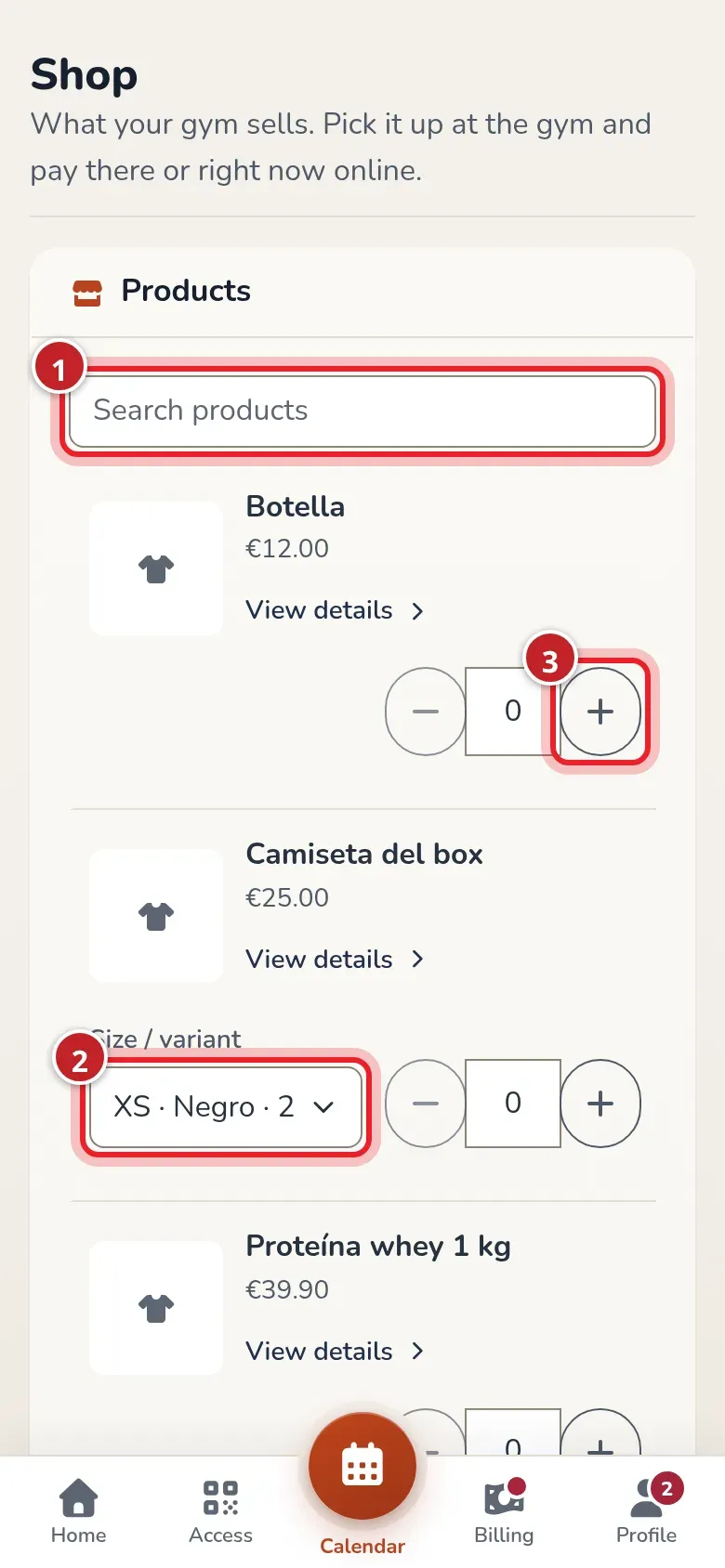
Section titled “How to place an order”- Open Shop. The search bar is at the top; products featured by the gym come first.
- To see a product up close, tap its photo or View details. Its page opens with all the photos (swipe or tap the thumbnails), the sizes running low and the description. From there you choose size and quantity; Done takes you back to the list with the product already added.
- If the product comes in sizes or colors, choose yours in Size / variant. A product or size that’s out of stock shows as Sold out.
- Tap + to add units. The total updates with VAT included.
- If your gym has several locations, choose in Where you pick it up where you’ll pick it up. Your location is selected by default.
- Choose how you pay and confirm:
- Pay at the gym: the order stays pending payment and you pay when you pick it up.
- Pay now: you go to the card payment page and come back to the shop with the order paid.
You get an in-app message and an email with the purchase details.
If your gym decides so, some products (or the whole shop) must be paid online when you order: they carry the Online payment only label and, while they’re in your order, Pay at the gym doesn’t appear. If your billing details are missing, complete them in Billing so you can pay.
If your gym doesn’t use QR access, the bottom bar has the Shop tab, which takes you straight to the shop. While you have unread notifications, Notifications shows in its place.
My purchases
Section titled “My purchases”Below the shop, My purchases lists your orders, pending ones first:
- Payment pending: you haven’t paid it yet. If your gym takes online payments, you have the Pay now button to pay it by card.
- Paid: with the method you paid it with.
- If the gym has refunded you something, you see it next to the order with the refunded amount.
Shop debt also shows in the notice on Home, but the “Pay now” button in that notice only pays your monthly fee: orders are paid from Shop or at the gym.
Video: Turning on the “Member shop”
Section titled “Video: Turning on the “Member shop””Transcript
Right now your members don’t see the gym’s shop in the app.
You turn it on in the gym’s general settings.
The same products and prices you sell at the counter.
Check the box and save.
Right away, the member has the shop on their Home.
And from there, everything you have for sale.
Video: Where the shop is: Home, Profile and Billing
Section titled “Video: Where the shop is: Home, Profile and Billing”Transcript
Your gym’s shop is on your Home…
…in the shortcuts on your Profile…
…and in My billing, next to your receipts.
Inside, everything the gym sells.
Search by name.
And choose your size and color.
Video: The member buys in the shop and pays at the gym
Section titled “Video: The member buys in the shop and pays at the gym”Transcript
Alba wants two of the gym’s bottles.
She picks how many with the + button.
And which location she’ll pick them up at.
She’ll pay at the gym when she comes to get them.
In My purchases, pending payment.
The gym sees it right away, marked as an online order.
When she comes to pick it up…
…it’s charged like any counter sale.
And her app already shows it as paid.
Video: The member buys and pays now by card
Section titled “Video: The member buys and pays now by card”Transcript
If the gym takes online payments, you can pay now.
Alba picks her T-shirt…
…and a bottle.
She’s back in the shop with the order paid.
The gym sees it as paid, without doing anything.
All that’s left is handing it over when she comes in.
Video: The pending purchase in the Home notice and “Pay now” from “My purchases”
Section titled “Video: The pending purchase in the Home notice and “Pay now” from “My purchases””Transcript
Alba owes her month and a bottle she ordered to pay at the gym.
“Pay now” only pays the fee. The shop is separate.
Shop items are paid from My purchases…
Only her fee is left, which she pays with “Pay now.”
Video: Unfinished “Pay now”: the order cancels itself
Section titled “Video: Unfinished “Pay now”: the order cancels itself”Transcript
She has one hour to pay it from My purchases.
Meanwhile, she owes it.
If she doesn’t pay within that hour…
…the order is canceled automatically.
She owes nothing.
At the gym, the sale shows as canceled, and the stock goes back.