
How to manage a class in RoninBox
To manage a class in RoninBox, open it in the calendar and use the admin controls in its window: add or remove spots, close or reopen it, and remove a member. Deleting the class is done from the event list. Coaches can also add spots, remove spots and remove a member; only administrators can close, reopen and delete. Members see the same window without those controls. The list of attendees appears in the order they signed up.
Open the class
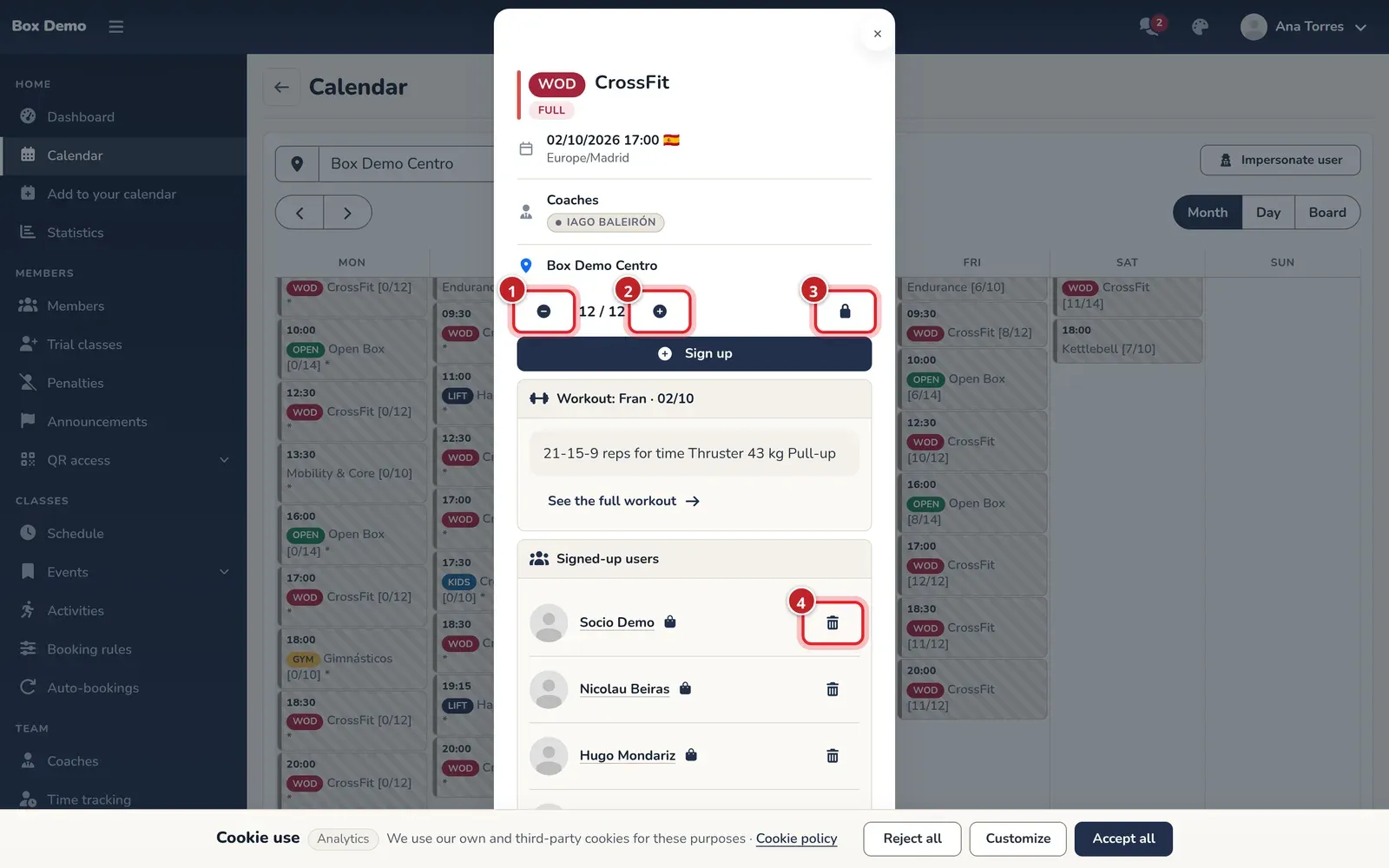
Section titled “Open the class”Open Calendar, find the day and tap the class (How the calendar works). You’ll see the row of controls below the class details.
Add or remove spots
Section titled “Add or remove spots”- The minus icon (marker 1) Remove spots removes one spot.
- The plus icon (marker 2) Add spots adds one spot.
- Between them you see the spots taken out of the total, for example 12 / 14.
Each tap changes one spot. Reducing only applies if there is a free spot: if the class is full, nothing happens. To take someone out, remove them from the class. Adding spots doesn’t notify the waitlist.
Close and reopen
Section titled “Close and reopen”The lock (marker 3) Close class toggles between closed and open. When you close it, the «Class closed» label appears and the lock turns green.
A closed class is frozen for members: they can’t sign up, join the waitlist or cancel. As an administrator, you can still add and remove members.
Remove a member from the class
Section titled “Remove a member from the class”In Signed-up users, the trash icon (marker 4) Remove from class removes the member. Because the administrator does it, the member gets their credit back and no late-cancellation penalty applies. If a spot opens up and there are people on the waitlist, they all get an email notification (The waitlist).
To add someone, see How to sign up a member.
Delete a class
Section titled “Delete a class”Deleting is done in Event list, with the trash icon on the row (How to create a one-off class).
Common mistakes
Section titled “Common mistakes”- I tap reduce and the spots don’t go down. The class is full. Remove a member first.
- A member says they can’t cancel. Check whether the class is closed.