
How to manage coaches in RoninBox
Published on
To manage coaches in RoninBox, open Coaches in the menu. The Coaches page brings together your team, who teaches each class and each coach’s numbers. Changes are made by the administrator; a coach sees it in read-only mode.
The four tabs
Section titled “The four tabs”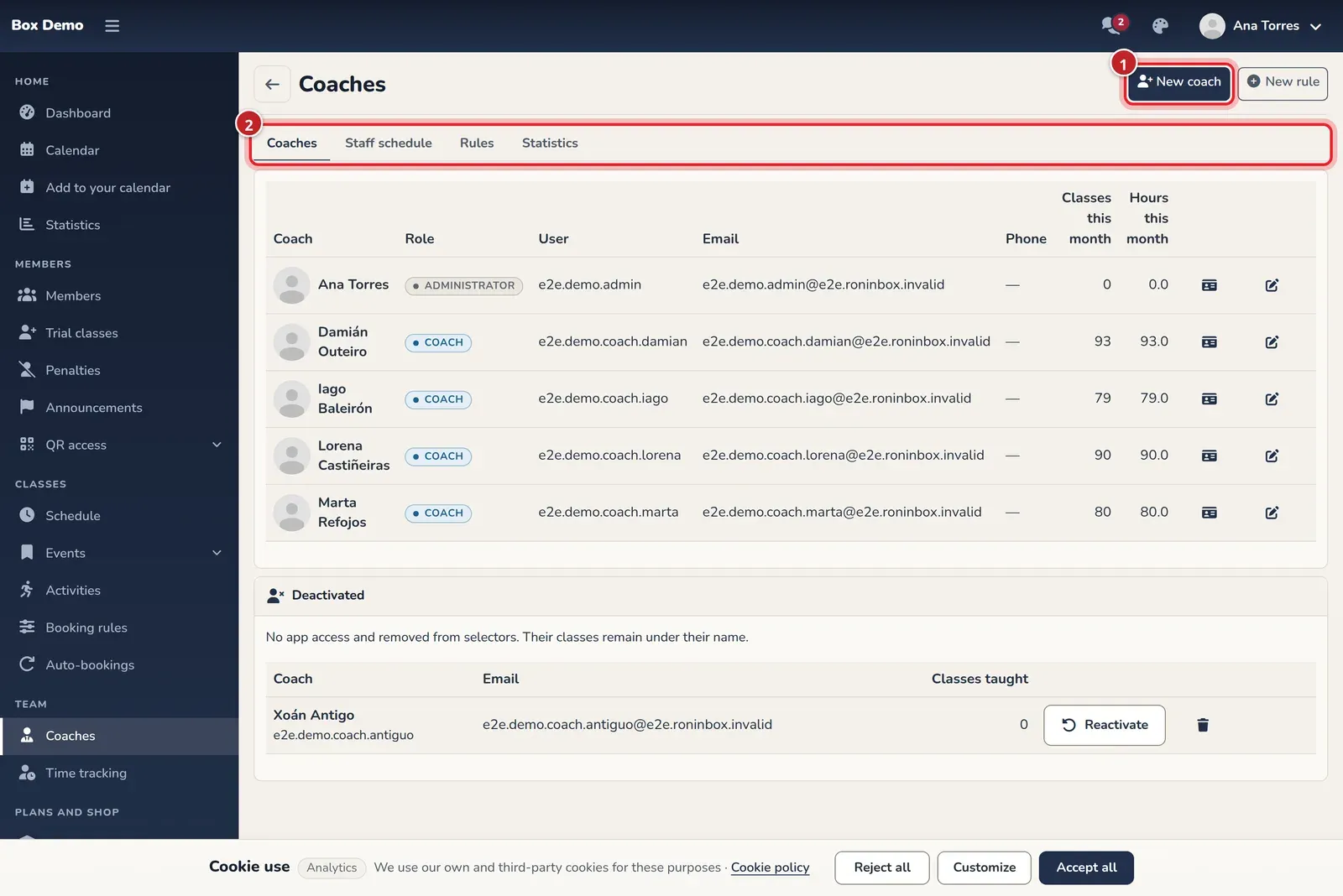
- Coaches: the team, with role, user, contact info and the month’s classes and hours. This is the tab this page describes.
- Staff schedule: the gym’s week with the coach for each class. See schedule.
- Rules: the rules that decide who teaches each class. See coach rules.
- Statistics: numbers per coach and comparison. See coach statistics.
In the top right you have New coach and New rule.
Add a coach
Section titled “Add a coach”Tap New coach (marker 1). The new user form opens, already set up for a coach: it’s a user account with the coach role. More on creating users in create a member.
What you can do with each coach
Section titled “What you can do with each coach”Each row in the table has icons:
- View profile and Edit profile: open their user record.
- Remove as coach: removes their coach role. Their account isn’t deleted and keeps its other roles. They no longer appear in the list or can be selected in rules, but they stay in the rules and classes they were already in until you edit them.
- Deactivate: the person leaves the gym without losing their history. Their access to the app is shut off and they can no longer be selected. The classes they taught stay under their name. Their future rules and classes aren’t changed: edit them if you want to switch coaches. The app shows you those numbers before you confirm.
An administrator can’t be deactivated as a coach, because they would lose access to the gym. You also can’t deactivate yourself.
Deactivated: reinstate or delete
Section titled “Deactivated: reinstate or delete”Below the table, the Deactivated card shows everyone who’s deactivated.
- Reactivate: restores their access to the app and they can be selected as a coach again.
- Delete permanently: permanently deletes their account from this gym. It’s only offered if they never taught a class; otherwise, a lock appears. If they have payments, messages or other data, it can’t be done either.
Common mistakes
Section titled “Common mistakes”- I can’t find a coach in the rules. If you removed them as a coach or deactivated them, they can no longer be selected.
- I can’t delete them. They’ve taught classes: keep them deactivated.